How to Use DeepSeek AI for Translation
Last updated: August 24, 2026
Competitor source check — September 7, 2026. DeepL’s features page and Google Cloud Translation’s language documentation were both re-read on this date. Every DeepL and Google Translate claim below carries that date; where a claim retains an earlier checkpoint it is stated beside the claim.
DeepSeek can translate text when you give it clear instructions, but the best results depend on context, tone, glossary, locale, and human review. This guide explains How to Use DeepSeek AI for Translation in DeepSeek Chat and through the DeepSeek API, with ready-to-copy prompts, long-document workflows, privacy warnings, and practical tips for better multilingual translation.
Quick Answer:
To use DeepSeek AI for translation, open DeepSeek Chat, paste your source text, specify the source and target languages, add context, tone, locale, and formatting rules, then ask DeepSeek to translate without adding extra commentary. For better results, use a glossary, review names and numbers, and have a human check high-stakes translations.
DeepSeek’s current official model and pricing documentation lists three API IDs: the text models deepseek-v4-flash and deepseek-v4-pro, plus the experimental deepseek-v4-flash-vision-exp. All three list thinking and non-thinking modes, a 1M-token context, a maximum 384K output, JSON Output, Tool Calls, and the native Responses API. Vision Exp accepts text plus supported images and returns text; it does not generate translated images.
What You Can Do
DeepSeek can produce a translation draft, enforce a supplied glossary, preserve product names, generate a back-translation, and flag wording that deserves human review. A controlled workflow is most useful for support and product text where negation, numbers, named products, and procedural verbs must survive the translation. Final approval should still come from a qualified reviewer for the target locale.
Required Inputs
- The complete source text with headings, warnings, units, and formatting.
- Target language and locale, such as Mexican Spanish rather than generic Spanish.
- Required tone, audience, and formality level.
- An approved glossary and a do-not-translate list for names and model numbers.
- Rules for numbers, punctuation, back-translation, and risk reporting.
Step-by-Step Workflow
- Normalize the source and mark safety-critical sentences, negatives, and numbers.
- Supply locale, tone, glossary, and protected terms in the prompt.
- Request the translation without stylistic expansion.
- Generate a literal back-translation as a separate verification layer.
- Compare names, numbers, negation, order of actions, and glossary terms.
- Send the draft and risk notes to a native or qualified reviewer.
Tested Prompt
This is the verbatim source, glossary, and output instruction used in the live translation test.
You are completing a reproducible English-to-Spanish translation benchmark. Use only the source and instructions below. Do not browse. Target locale: Mexican Spanish. Address the reader formally with “usted.” Preserve every warning, condition, number, product name, and negation. Required glossary: computer → computadora; power cycle → reinicio eléctrico; technical support → soporte técnico; Do not translate SafeLock, Model X2. Source: “Before connecting Model X2 to your computer, close the SafeLock application. Customers must not reset the sensor until the blue indicator stops flashing. If the light remains solid for more than 30 seconds, perform one power cycle. If it still remains solid, contact technical support. Do not disconnect the cable during the update.” Return exactly: 1. MEXICAN SPANISH TRANSLATION. 2. GLOSSARY COMPLIANCE TABLE listing every required term and its rendered form. 3. BACK-TRANSLATION into English for verification. 4. RISK CHECK listing any ambiguity or wording that requires a human linguist or product expert. Do not add troubleshooting steps or claims not present in the source.Example Output
Antes de conectar Model X2 a su computadora, cierre la aplicación SafeLock. No restablezca el sensor hasta que el indicador azul deje de parpadear. Si la luz permanece fija durante más de 30 segundos, realice un reinicio eléctrico. Si aún permanece fija, comuníquese con soporte técnico. No desconecte el cable durante la actualización.
Original Test Results
Score: 15/15 (100%). The translation preserved SafeLock and Model X2, every negative instruction, the 30-second condition, and the action order while using formal address. It used all three required Mexican Spanish glossary terms. The back-translation retained the complete meaning without dropping a condition. The risk review appropriately flagged the distinction between restarting and a power cycle, the wording of a solid status light, and possible regional phrasing around contacting support.
Original test run: July 29, 2026 · DeepSeek Chat · Instant mode · synthetic English source text and English instructions, with a supplied English–Mexican Spanish glossary · Mexican Spanish translation and English back-translation · no web search.
Verification Checklist
- Compare every number, condition, product name, and negation with the source.
- Check all mandatory glossary terms and protected names.
- Verify that the sequence and warnings did not change.
- Review the back-translation for omissions or added steps.
- Test ambiguous operational verbs with the product team.
- Obtain a qualified target-locale review before publication.
Limitations
A perfect score on a short synthetic sample does not prove quality across legal, medical, literary, or highly technical material. Back-translation can repeat the same mistake rather than reveal it. Terminology may vary by company and region, and sensitive content may require specialist review, translation memory, controlled terminology, and an approved privacy process.
Related Solution
For reviewed multilingual support and customer-content workflows, see DeepSeek for Customer Operations and Commerce.
What Is DeepSeek AI Translation?
DeepSeek AI translation means using DeepSeek’s chat interface or API to translate text from one language to another. DeepSeek is not presented in its official materials as a dedicated standalone translator in the same way as Google Translate or DeepL. It is better understood as a general AI assistant and model platform that can perform translation tasks when prompted properly.
This matters because a DeepSeek translation prompt can do more than convert words. You can ask it to preserve tone, adapt wording for a specific country, rewrite for a business audience, keep Markdown or HTML formatting, explain difficult terms, or compare alternative translations.
DeepSeek is especially useful for context-aware translation, localization drafts, tone adjustment, multilingual rewriting, and glossary-based translation. However, it should not be treated as a guaranteed source of perfect translation. DeepSeek’s Terms of Use say outputs may contain errors or omissions, should not be treated as professional advice, and should undergo human review when they may have legal or material impact.
When Should You Use DeepSeek for Translation?
You can use DeepSeek for translation when you need more control than a basic “translate this” workflow. It is useful for casual translation, emails, business messages, blog localization, technical documentation drafts, software strings, subtitle drafts, academic text, and research notes.
DeepSeek can be particularly helpful when the translation needs tone and context. For example, you can ask it to translate a customer support reply into formal Spanish for Mexico, localize a landing page into natural French for France, or translate a technical paragraph while keeping product terms unchanged.
Do not rely on DeepSeek alone for legal, medical, certified, financial, compliance, confidential, or client-critical translation. For these cases, use DeepSeek only as a draft or support tool, then send the output to a qualified human translator, subject-matter expert, or reviewer. This is consistent with DeepSeek’s own warning that professional issues require professional guidance and that important outputs should be reviewed.
How to Use DeepSeek AI for Translation in DeepSeek Chat
Follow these steps to translate text with DeepSeek Chat.
Step 1: Open DeepSeek Chat or the app
Go to DeepSeek Chat or open the DeepSeek app. DeepSeek’s official website currently links users to DeepSeek Chat, the app, and the API platform.
Step 2: Choose the right mode or model if available
Some interfaces may offer model or mode choices. For routine text translation, a faster model or non-thinking mode may be enough. For complex terminology or long-context text review, compare Flash and Pro with the same evaluation set; a thinking mode may help only when testing shows a useful improvement. The current API catalog also includes experimental Vision Exp for text inside images. DeepSeek documents thinking and non-thinking modes for all three models, but the published effort-mapping table is explicitly scoped to Flash and Pro.
Sampling caveat: In thinking mode, DeepSeek says
temperature,top_p,presence_penalty, andfrequency_penaltydo not take effect. Use sampling controls only with thinking explicitly disabled. Even then, a low temperature can reduce variation but does not guarantee deterministic output or translation accuracy; validate terminology, names, numbers, omissions, and formatting on representative text and use qualified human review where errors matter.
Step 3: Paste the source text
Paste the text you want to translate. For long content, paste one section at a time instead of an entire document with no structure.
Step 4: Specify source and target languages
Do not rely only on automatic language detection. Write the source language and target language clearly.
Example:
Translate from English to German.Step 5: Add context, audience, tone, and locale
A strong DeepSeek translation prompt includes context. For example:
This is a customer support email for a SaaS product. Translate it into Spanish for users in Mexico. Use a polite, professional tone.Locale matters. Spanish for Mexico, Spanish for Spain, and Spanish for Argentina can differ in vocabulary and tone.
Step 6: Ask DeepSeek to preserve formatting
Tell DeepSeek whether it should preserve paragraph breaks, bullet points, tables, Markdown, HTML tags, placeholders, or product names.
Step 7: Review and refine the translation
Check meaning, numbers, dates, names, URLs, formatting, idioms, and terminology. Ask DeepSeek to revise specific parts rather than regenerating the entire translation.
Step 8: Ask for explanations or alternatives if needed
For difficult phrases, ask DeepSeek to explain its choices or provide two alternatives: literal and natural.
Basic DeepSeek Translation Prompt
Translate the following text from [source language] to [target language]. Preserve the original meaning, tone, paragraph breaks, and formatting. Do not add explanations.

Text:
[source text]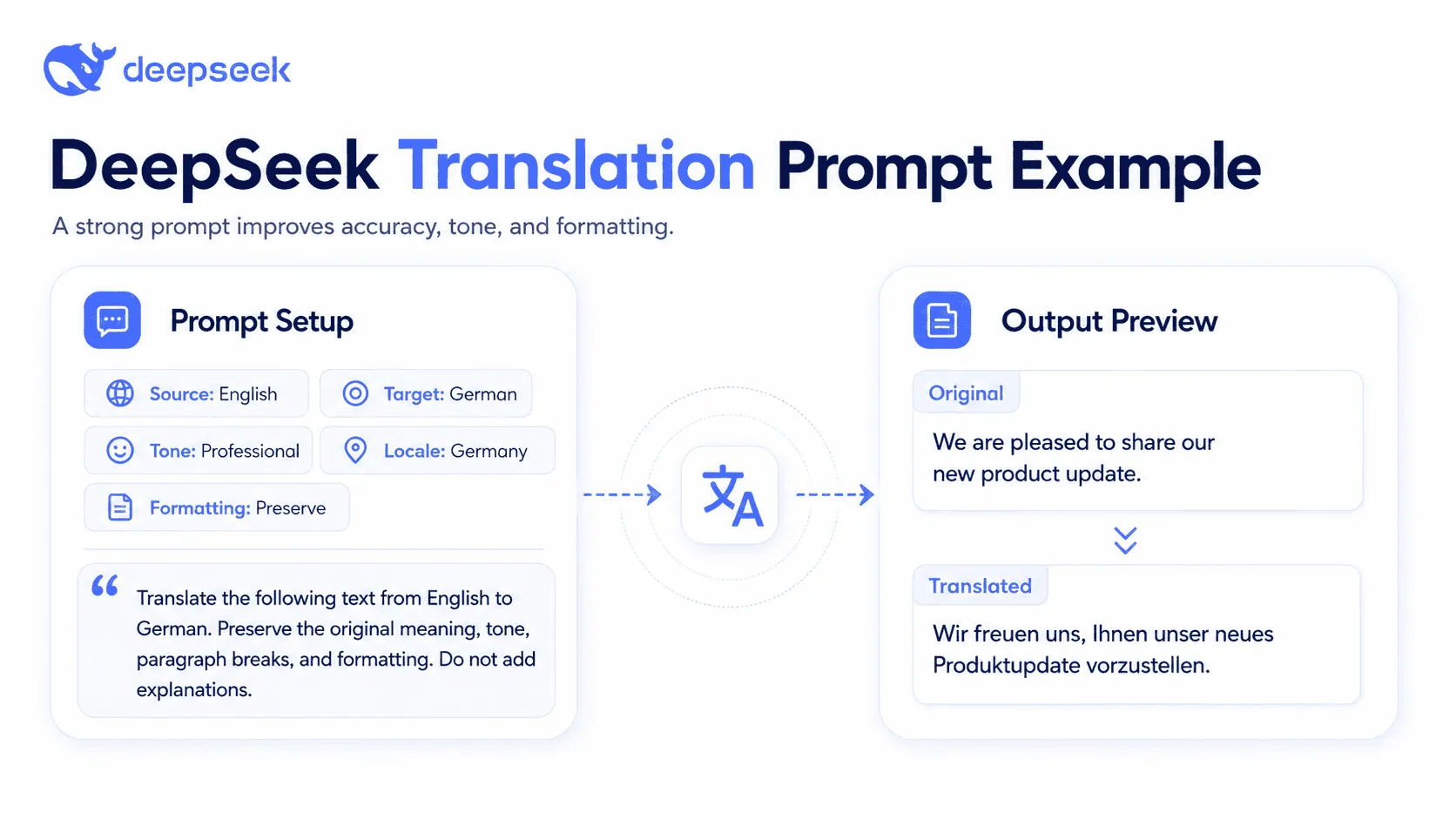
Best DeepSeek Translation Prompts
Use these DeepSeek translation prompts as starting points.
| Use Case | Prompt | Best For |
|---|---|---|
| Basic translation | Translate the following text from [source language] to [target language]. Preserve meaning and formatting. Do not add commentary. Text: [text] | Fast everyday translation |
| Professional business translation | Translate this business message into [target language] for [audience]. Use a polished, professional tone. Keep the meaning accurate and natural. | Emails, proposals, reports |
| Localization for a specific country | Translate and localize this text for [target country/locale]. Adapt idioms, tone, spelling, and cultural references naturally. | Marketing and website copy |
| Technical translation with glossary | Translate this technical text into [target language]. Use this glossary exactly: [terms]. Do not translate product names or code snippets. | Documentation, SaaS, engineering |
| Literary translation | Translate this passage into [target language]. Preserve imagery, rhythm, emotional tone, and style. Avoid overly literal phrasing. | Creative writing |
| Academic translation | Translate into formal academic [target language]. Preserve citations, terminology, argument structure, and hedging language. | Research papers, abstracts |
| Marketing translation | Translate and adapt this copy for [locale]. Preserve persuasive intent, brand voice, and call-to-action strength. | Ads, landing pages |
| Subtitle translation | Translate these subtitles into [target language]. Keep each line concise, natural, and easy to read. Preserve timestamps. | Video subtitles |
| Preserved HTML/Markdown | Translate only the visible text. Preserve all HTML/Markdown tags, attributes, links, placeholders, and code exactly. | CMS and web content |
| Translation plus quality check | Translate the text, then list any uncertain terms or phrases that need human review. | Professional review workflows |
| Back-translation check | Translate into [target language], then back-translate into [source language] and identify meaning shifts. | Accuracy checks |
| Side-by-side bilingual output | Output a two-column table: original sentence and translated sentence. Keep sentence alignment exact. | Editing and review |
How to Get Better Translation Results with DeepSeek
The most important rule is to give DeepSeek enough context. “Translate this” often produces a generic result. A better prompt explains the purpose, audience, tone, locale, formatting rules, and terminology.
Define the audience before translating. A translation for legal professionals, casual social media users, software developers, or university students should not sound the same.
Specify tone and formality. For languages with formal and informal address, such as German, French, Spanish, or Japanese, tell DeepSeek whether the output should be formal, neutral, friendly, or casual.
Use a glossary for technical content. List the exact translations for product names, feature names, legal terms, medical terms, brand vocabulary, or industry jargon.
Provide examples of preferred style. A short sample sentence can help DeepSeek match your brand voice.
Ask DeepSeek to preserve formatting. This is essential for Markdown, HTML, software strings, subtitle timestamps, and tables.
Ask it to flag uncertainty. For example:
If any term has more than one possible translation, mark it with [REVIEW] and explain the options after the translation.For long documents, translate in chunks. After each chunk, ask for a terminology consistency check. At the end, ask DeepSeek to review the whole translated document for inconsistent terms, missing sections, and formatting issues.
How to Translate Long Texts, Documents, or PDFs with DeepSeek
Long documents need a workflow, not a single prompt. Even though the DeepSeek API documentation currently lists a 1M context length for V4 models, long-context capacity does not automatically guarantee perfect document formatting, complete translation, or terminology consistency.
For PDFs, DOCX files, spreadsheets, or other formatted documents, extract the text in your application and translate it in controlled sections. DeepSeek’s current Files API is for JPEG, PNG, GIF, and WebP images used with Vision; it is not a general document-upload or layout-preservation API. For a scanned or visually significant page, render only the required page to a supported image, use Vision to transcribe and translate the visible text, and verify both the wording and layout separately.
Long document workflow
- Extract the text from the document, PDF, or CMS.
- Create a glossary of names, product terms, technical terms, and phrases that must stay unchanged.
- Write a style guide with audience, tone, locale, spelling, and formatting rules.
- Split the document into sections such as introduction, headings, tables, captions, and appendices.
- Translate one section at a time using the same glossary and style guide.
- Ask for a consistency check after every few sections.
- Run a final review prompt to find missing sentences, inconsistent terminology, broken formatting, and mistranslated numbers.
- Send high-value translations to a human reviewer before publication or delivery.
Final review prompt for long translations
Review the translated document below against the source text. Check for:
1. Missing sentences or paragraphs
2. Mistranslated names, numbers, dates, and units
3. Inconsistent terminology
4. Formatting changes
5. Overly literal or unnatural wording

Return a table with Issue | Source excerpt | Translation excerpt | Suggested fix.

Source:
[source text]

Translation:
[translated text]
Translate Text Inside Images with DeepSeek Vision
deepseek-v4-flash-vision-exp can transcribe and translate text visible in screenshots, signs, posters, product labels, scanned pages, and user-interface images. It returns text rather than an edited image. Ask it to separate transcription from translation, preserve names and numbers, mark unreadable text, and avoid guessing cropped or hidden content. Verify high-value translations against the image with a fluent human reviewer.
The official Vision API accepts a public HTTP(S) image URL, an inline Base64 data: URL, or a previously uploaded image referenced by Files API file_id. Chat Completions image blocks belong in a user message. Files currently supports JPEG, PNG, GIF, and WebP images only; it does not turn PDF, DOCX, CSV, or ZIP into general file inputs.
Python example: URL, Base64, or file_id
import base64
import os
from openai import OpenAI

client = OpenAI(
    api_key=os.environ["DEEPSEEK_API_KEY"],
    base_url="https://api.deepseek.com",
)

mode = os.environ.get("IMAGE_INPUT_MODE", "url")

if mode == "url":
    image_block = {
        "type": "image_url",
        "image_url": {
            "url": "https://example.com/source-label.png",
            "detail": "high",
        },
    }
elif mode == "base64":
    with open("source-label.png", "rb") as image_file:
        encoded = base64.b64encode(image_file.read()).decode("utf-8")
    image_block = {
        "type": "image_url",
        "image_url": {
            "url": f"data:image/png;base64,{encoded}",
            "detail": "high",
        },
    }
elif mode == "file_id":
    image_block = {
        "type": "file",
        "file_id": os.environ["DEEPSEEK_IMAGE_FILE_ID"],
    }
else:
    raise ValueError("IMAGE_INPUT_MODE must be url, base64, or file_id")

response = client.chat.completions.create(
    model="deepseek-v4-flash-vision-exp",
    messages=[
        {
            "role": "user",
            "content": [
                {
                    "type": "text",
                    "text": (
                        "First transcribe every visible line exactly. Then translate it "
                        "into [target language]. Preserve names, numbers, and line order. "
                        "Mark unreadable text as [UNCLEAR] and do not invent missing words."
                    ),
                },
                image_block,
            ],
        }
    ],
    extra_body={"thinking": {"type": "disabled"}},
)

print(response.choices[0].message.content)
For the file_id branch, upload the image first with client.files.create(file=image_file, purpose="user_data") and use the returned ID, which begins with file-api-. Files operations are free, but analysis of the referenced image is billed as input tokens. See the official Vision guide and Files API guide for current formats and size limits.
How to Use DeepSeek API for Translation
The DeepSeek API is useful when you want to translate content at scale: product descriptions, website strings, CMS entries, help center articles, app interfaces, subtitles, or localization files.
DeepSeek’s API docs state that the API uses a format compatible with OpenAI and Anthropic, and the current Models & Pricing page lists https://api.deepseek.com as the OpenAI-format base URL.
As verified on August 24, 2026, DeepSeek’s official model list contains deepseek-v4-flash, deepseek-v4-pro, and the experimental deepseek-v4-flash-vision-exp. Flash and Pro accept text; Vision Exp accepts text plus supported images and returns text. The July 24, 2026 cutoff announced for deepseek-chat and deepseek-reasoner has passed, and neither alias is currently listed. A bounded Seek-Chat.com test on July 28, 2026 observed both legacy names being accepted and returning Flash, but this is a dated runtime observation rather than an official lifecycle reversal. Translation applications should use a listed V4 ID, set thinking mode explicitly, and test the exact language pair, glossary, formatting, latency, and cost requirements before deployment.
For text-only translation, benchmark deepseek-v4-flash and deepseek-v4-pro on representative language pairs, terminology, formatting, latency, cost, and human-review scores; DeepSeek does not publish a universal rule that makes one model best for every language pair. Use deepseek-v4-flash-vision-exp when the source text is inside an image. Vision Exp has the same published token rates and account-wide concurrency limit as Flash, and image dimensions are converted to input tokens for billing. For predictable non-thinking workflows, disable thinking explicitly; enable it only when testing shows a useful benefit. High-stakes content still requires qualified human review.
Python example: DeepSeek API translation
import os
from openai import OpenAI

api_key = os.environ.get("DEEPSEEK_API_KEY")
if not api_key:
    raise RuntimeError("Missing DEEPSEEK_API_KEY environment variable.")

client = OpenAI(
    api_key=api_key,
    base_url="https://api.deepseek.com",
)

system_prompt = """
You are a professional translator.
Translate accurately and naturally.
Preserve formatting, names, numbers, URLs, and placeholders.
Return only the translation unless the user asks for notes.
"""

user_prompt = """
Translate the following text from [source language] to [target language].

Context:
- Audience: [target audience]
- Locale: [target locale]
- Tone: [formal / neutral / friendly / marketing / academic]
- Glossary: [term 1 = translation 1; term 2 = translation 2]

Text:
[source text]
"""

response = client.chat.completions.create(
    model="deepseek-v4-flash",
    messages=[
        {"role": "system", "content": system_prompt},
        {"role": "user", "content": user_prompt},
    ],
    temperature=0.2,
    stream=False,
    extra_body={
        "thinking": {"type": "disabled"}
    },
)

print(response.choices[0].message.content)
cURL example
curl https://api.deepseek.com/chat/completions \
  -H "Authorization: Bearer ${DEEPSEEK_API_KEY}" \
  -H "Content-Type: application/json" \
  -d '{
    "model": "deepseek-v4-flash",
    "temperature": 0.2,
    "thinking": {
      "type": "disabled"
    },
    "stream": false,
    "messages": [
      {
        "role": "system",
        "content": "You are a professional translator. Preserve meaning, formatting, names, numbers, URLs, and placeholders. Return only the translation."
      },
      {
        "role": "user",
        "content": "Translate the following text from [source language] to [target language]: [source text]"
      }
    ]
  }'
JSON output for structured translation results
DeepSeek’s API documentation supports JSON output through response_format: {"type": "json_object"} and says users should also include the word “json” in the prompt and provide the expected JSON format.
import json
import os
from openai import OpenAI

api_key = os.environ.get("DEEPSEEK_API_KEY")
if not api_key:
    raise RuntimeError("Missing DEEPSEEK_API_KEY environment variable.")

client = OpenAI(
    api_key=api_key,
    base_url="https://api.deepseek.com",
)

messages = [
    {
        "role": "system",
        "content": """
Return valid JSON only.
Use this exact JSON structure:
{
  "translation": "...",
  "review_notes": ["..."],
  "uncertain_terms": ["..."]
}
"""
    },
    {
        "role": "user",
        "content": """
Translate this from [source language] to [target language].
Preserve meaning and formatting.

Text:
[source text]
"""
    }
]

response = client.chat.completions.create(
    model="deepseek-v4-pro",
    messages=messages,
    response_format={"type": "json_object"},
    max_tokens=2000,
    # Thinking is enabled by default on V4 Pro, and reasoning tokens are
    # charged against the same completion budget. With max_tokens=2000 a
    # long chain of thought can consume the whole allowance and return
    # empty content, which is the failure this page warns about.
    extra_body={"thinking": {"type": "disabled"}},
)

content = response.choices[0].message.content
if not content:
    raise RuntimeError("DeepSeek returned empty content. Try improving the JSON prompt or retrying.")

result = json.loads(content)
print(result["translation"])
One important API detail: DeepSeek’s /chat/completions API is stateless, meaning the server does not retain previous request context. If your translation depends on a glossary, style guide, or earlier conversation, pass that information again in each request or manage it in your application.
DeepSeek Translation Prompt Template
Copy and adapt this master DeepSeek translation prompt.
You are a professional translator and localization editor.

Task:
Translate the text below from [source language] to [target language].

Locale:
[target country or region]

Audience:
[target audience]

Tone:
[formal / neutral / friendly / academic / technical / marketing]

Context:
[Explain where the text will appear and what it is for.]

Glossary:
- [source term] = [required target translation]
- [source term] = [required target translation]

Formatting rules:
- Preserve paragraph breaks, headings, bullet points, tables, Markdown, HTML tags, URLs, placeholders, and code exactly.
- Do not translate brand names, product names, variables, or placeholders unless listed in the glossary.
- Keep numbers, dates, units, and currency accurate.

Output rules:
- Return only the translated text.
- Do not add explanations.
- If a term is ambiguous, mark it with [REVIEW].

Quality check:
After translating, silently check for missing sentences, incorrect names, wrong numbers, broken formatting, and inconsistent terminology.

Text:
[source text]
DeepSeek vs Google Translate vs DeepL vs ChatGPT for Translation
Documentation-based comparison, not a translation-quality ranking. Google Translate exposes text, image, document, and website translation routes. DeepL documents text and document translation and customization features. Check the selected language pair, route, and plan rather than assuming that every feature is available in every interface.
For a prompt-based workflow, specify the source text, target language and locale, glossary, and editing boundaries. DeepSeek’s API documentation describes its message-based integration route; OpenAI’s prompting guide explains supplying context, output requirements, and boundaries. These controls let you request a translation draft; they do not guarantee terminology compliance or establish superiority over a dedicated translator.
| Tool and route | Documented or stated workflow scope | What to check before choosing |
|---|---|---|
| DeepSeek Chat or custom API workflow | Translation requested through instructions. The July 29, 2026 example above is a limited test of the stated DeepSeek setup, not of competing tools. | Record the model or mode and target locale. Check glossary adherence, omissions, added claims, and the terms of the exact service or intermediary used. |
| Google Translate | Dedicated translation interface with text, image, document, and website routes. | Confirm language-pair and input-format support for the selected route. Review names, numbers, meaning, and layout on your own sample. |
| DeepL Translator / document route | Dedicated translation and document workflows; the provider also lists glossary and customization features. | Confirm which glossary, document, and customization features apply to the chosen language pair and plan. Do not infer quality from the presence of a feature. |
| ChatGPT prompt-based workflow | Instructions can specify source context, target output, and boundaries; follow-up messages can request revisions. | Record the model, plan, and tools used. Review the translation against the original and distinguish requested rewriting from faithful translation. |
Common Mistakes to Avoid
Avoid asking only “translate this” with no context. DeepSeek can produce better translation when it knows the audience, purpose, locale, tone, and terminology.
Do not ignore locale differences. “Portuguese” can mean Portugal or Brazil. “English” can mean US, UK, Australian, or another variant.
Do not translate too much text in one unstructured prompt. Break long content into sections and use consistent instructions.
Do not forget formatting rules. For CMS, code, HTML, Markdown, subtitles, and software strings, formatting preservation is critical.
Do not trust AI output blindly. DeepSeek’s own terms say outputs may contain errors or omissions, and important outputs should undergo human review.
Do not submit sensitive personal, legal, medical, financial, confidential, or client data without understanding privacy obligations and permissions. DeepSeek’s privacy policy says it may collect user inputs, uploaded files, photos, feedback, and chat history, and says personal data is directly collected, processed, and stored in the People’s Republic of China.
Troubleshooting: Why DeepSeek Translation May Be Wrong
If DeepSeek adds information that was not in the source, use this prompt:
Revise the translation. Do not add, infer, summarize, or explain anything that is not present in the source text.If it misses a sentence or paragraph, ask:
Compare the source and translation sentence by sentence. Identify any missing content and provide a corrected full translation.If the tone is wrong, specify the desired tone:
Revise the translation to sound formal, professional, and natural for [target locale]. Keep the meaning unchanged.If it mixes languages, say:
Return the entire output only in [target language], except for brand names, URLs, code, and glossary terms marked as unchanged.If the translation is too literal, ask:
Rewrite the translation to sound natural to native speakers in [target locale], while preserving the original meaning.If formatting breaks, ask:
Redo the translation while preserving all Markdown, HTML tags, placeholders, line breaks, and punctuation structure exactly.If terminology is inconsistent, provide a glossary and ask DeepSeek to reapply it across the full translation.
Is DeepSeek Good for Professional Translation?
DeepSeek can be useful for professional translation workflows, but mainly as a drafting, productivity, localization, or review-support tool. It can help translators create first drafts, compare wording options, preserve terminology, generate bilingual tables, and identify uncertain phrases.
It should not replace qualified human review for legal, medical, certified, compliance, financial, client-facing, or high-value content. This is not just a conservative recommendation: DeepSeek’s Terms of Use state that outputs may be inaccurate or incomplete and should undergo human review when they could have legal or material impact.
For professional use, the safest workflow is:
Source text → glossary → DeepSeek translation draft → quality check → human review → final publicationFAQs
Can DeepSeek translate text?
Yes. DeepSeek can translate text when prompted clearly. It works best when you specify the source language, target language, locale, audience, tone, formatting rules, and glossary.
Is DeepSeek better than Google Translate?
This page does not establish that DeepSeek translates better than Google Translate. The comparison above describes workflow differences, and the July 29, 2026 DeepSeek test is not a matched test of both products. Compare the same source text, language pair, locale, and terminology requirements, using a qualified reviewer and recorded product settings.
Is DeepSeek better than DeepL?
This page does not establish that DeepSeek is better or more flexible than DeepL. DeepL documents translation-specific and customization features; DeepSeek can be given translation instructions through a chat or API workflow. Check the features available in your exact route and plan, then evaluate the same translation sample instead of inferring quality from the product category.
Can DeepSeek translate documents?
DeepSeek can help translate document text, especially if you extract the text and translate it in structured sections. Do not assume complex layout preservation unless your specific DeepSeek interface or workflow supports it.
Can DeepSeek translate PDFs?
It can help translate PDF text after the text is extracted. For scanned PDFs, you may need OCR first. For layout-sensitive PDFs, use a dedicated document translation workflow and review the final formatting manually.
Is DeepSeek safe for translation?
It depends on the content and your privacy requirements. Avoid submitting sensitive personal, confidential, legal, medical, financial, or client data unless you have permission and understand DeepSeek’s data practices. DeepSeek’s privacy policy says it may collect user inputs and store personal data in China.
What is the best DeepSeek prompt for translation?
The best prompt includes source language, target language, locale, audience, tone, context, glossary, formatting rules, and output rules. Use the master prompt template above for the most reliable results.
Can I use DeepSeek API for bulk translation?
Yes. The DeepSeek API can be used for batch translation workflows in apps, CMS platforms, websites, and localization systems. Remember that the API is stateless, so your app must pass the needed glossary, style guide, and context with each request.
Conclusion
The best way to use DeepSeek AI for translation is to treat it as a context-aware translation assistant, not as a magic one-click replacement for human review. Start with a clear prompt, specify source and target languages, add locale and tone, provide a glossary, preserve formatting, and review the output carefully.
For simple text, DeepSeek Chat is enough. For websites, apps, CMS workflows, or bulk translation, the DeepSeek API gives developers more control. Start with the master prompt above, test it on a short paragraph, then scale to longer translation workflows with glossary checks and human review.